sprouts.ai
2025
The "Smart Brain" Pivot:
Redesigning AI Sales outreach to kill the generic pitch
Skip the scroll. Press play.
My role
Lead Product Designer - User Research, UI/UX Design, Prototyping, Usability Testing, Developer-Handoff
Team
Solo Designer, 2 Product
Manager, 4 Engineers
Timeline
6 Weeks
About the company
Sprouts.ai is an AI-powered sales intelligence platform that helps sales teams turn company data into personalized outreach at scale. SDRs and BDRs use it to identify accounts, enrich them with signals, and generate outbound messages.
The problem
The previous HPM experience broke down at three points:
1. Manual entry of PPFOs. SDRs and BDRs had to hand-write and re-order every pain point, feature, and outcome. It was slow, and because everyone did it their own way, the knowledge base ended up inconsistent from rep to rep.
2. Discoverability. The message feature was buried deep inside the Lists page — a contact had to be added to a list view before you could even message them. The core action was hidden behind setup.
3. Lack of trust. Credits were spent the moment a user hit generate. Nobody wanted to spend credits across multiple contacts without first knowing whether the output would be any good — so people hesitated, or didn’t use it at all.
The engine could technically generate messages. The workflow around it made people avoid it.
COMPETITOR BENCHMARKING
Key gaps in existing products (what HPM fixes)

Apollo.io
The Archetype: The Printer
Solves Problem Data but fails at Personalization. Messages feel robotic and "surface-level"

Clay
The Archetype: The Lego Box
Solves Problem Insights but fails on usability. It requires an "engineer mindset" to build workflows
Sprouts.ai
The Archetype: The Speechwriter
Solves all three. We use AI to get the Data, map it to Insights and enable safe Execution
Jobs to be done
Reframing those problems as jobs made the design targets obvious.
Sales Manager
When I roll my team onto outreach, I want one approved source of truth for our messaging, so the brand narrative stays consistent across every rep — without me policing it manually.
SDR / BDR — speed
When I need to reach a new prospect, I want the pain points, features, and outcomes ready to go, so I can send a personalized message in minutes instead of building the library from scratch.
SDR / BDR — trust
When I’m about to spend credits generating messages, I want to preview the quality first, so I can trust the output before I commit.
Three jobs, three friction points to remove: data setup, discoverability, and trust.
Design goals
Collapse PPFO setup from hours of manual entry to a near-instant, standardized starting point.
Let reps validate message quality before spending a single credit.
Pull the message action out from behind list setup and make it directly reachable.
The Old Flow
I architected a 3-step workflow centered on the PPFO Framework (Pain Points, Features, Outcomes) to address the three problems identified above.
Setting up messaging meant living inside the admin dashboard: add intros, add pain points, add features and outcomes, then manually re-order every condition by priority. High-effort, repetitive, and different every time depending on who did it.
Old flow — manual PPFO creation and re-ordering


The Solution
1. Auto-enrich the PPFOs — solving the data job
Instead of asking users to type, we asked them to paste. Drop in a company’s website URL, and the system scrapes it and auto-populates the Pain point, Feature, and Outcome tabs.
Cut time-to-value from hours of manual entry to a few seconds of processing.
Produced a consistent, standardized library — solving the sales manager’s “every rep does it differently” problem.
Website URL input — the enrichment entry point

In Development
1. Source attribution on every enriched PPFO
Every enriched item now carries a link icon back to the exact page it was extracted from.

2. Page-level scoping, not just whole-domain
"Page only" toggle lets a tenant scope enrichment to a single page — e.g., a company selling into multiple verticals enriching only their telecom-specific page, so telecom messaging doesn't blend with healthcare messaging.
Different divisions of one account need isolated messaging scopes without needing entirely separate accounts to get it.

3. Active customers and offerings as structured social proof
A dedicated Customers & Products section, letting a rep say "Razorpay also uses this for X" — accurate, specific, sourced.
Name-dropping a real customer is one of the highest-converting tactics in enterprise outreach.

4. Structured testimonials
Testimonials extracted with full attribution - name, title, company, source link, not raw scraped text.
An unattributed quote is nearly useless as proof; a structured, sourced one is citable in an actual message. Same underlying principle as #1 — content is only as trustworthy as its traceability.

5. AI-recommended signals and intent topics
AI now proactively recommends new targeting signals and intent topics the company hasn't defined yet - phrased as qualifying questions ("Does [company] report poor CRM data quality?") with a confidence tag.
This moves the product from documentation (reflecting what you already know) to strategy (surfacing what you're missing) — a materially higher trust bar, and worth being explicit about that shift rather than presenting it as "more of the same."

6. System-level prompt and a governed knowledge base - Reactive to Proactive
A persistent system prompt ("Use a warm but direct tone, reference one proof point max, avoid generic openers, tailor CTA by role") plus an uploadable content repository with per-document crawl status (Active/Retry).
This moves the product from documentation (reflecting what you already know) to strategy (surfacing what you're missing).
Intent topics: What other companies are searching in google — that are fetched from Bombora

7. The Extraction Preview modal
It shows exactly what the model pulled out (typed as Product, Process, Pain Point, etc.), how confident it was on each one (95%, 92%), and the actual evidence backing each claim — not just a source link, but the reasoning itself, inspectable.

Personalised Outreach
1. Why was AI messaging not in TCL earlier?
AI Message lived inside the list, not the TAL page, because the TAL page was already under load from real-time enrichment polling (website/phone data).
This was a backend constraint, not a design preference.

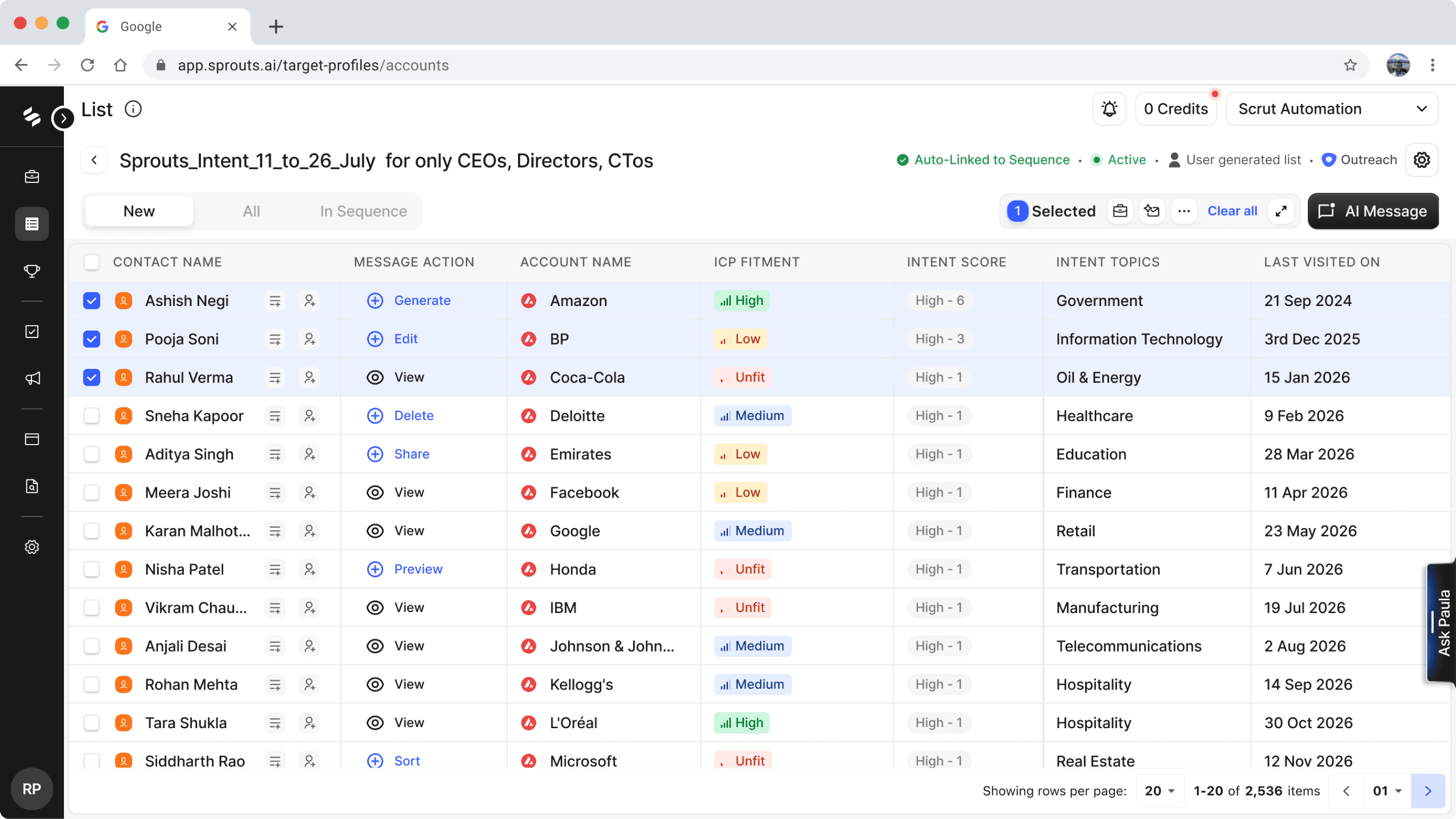
1. List page view:
Added contacts to the list page, so that we can track the performance of the list later on.
2. Usability vs Configurability
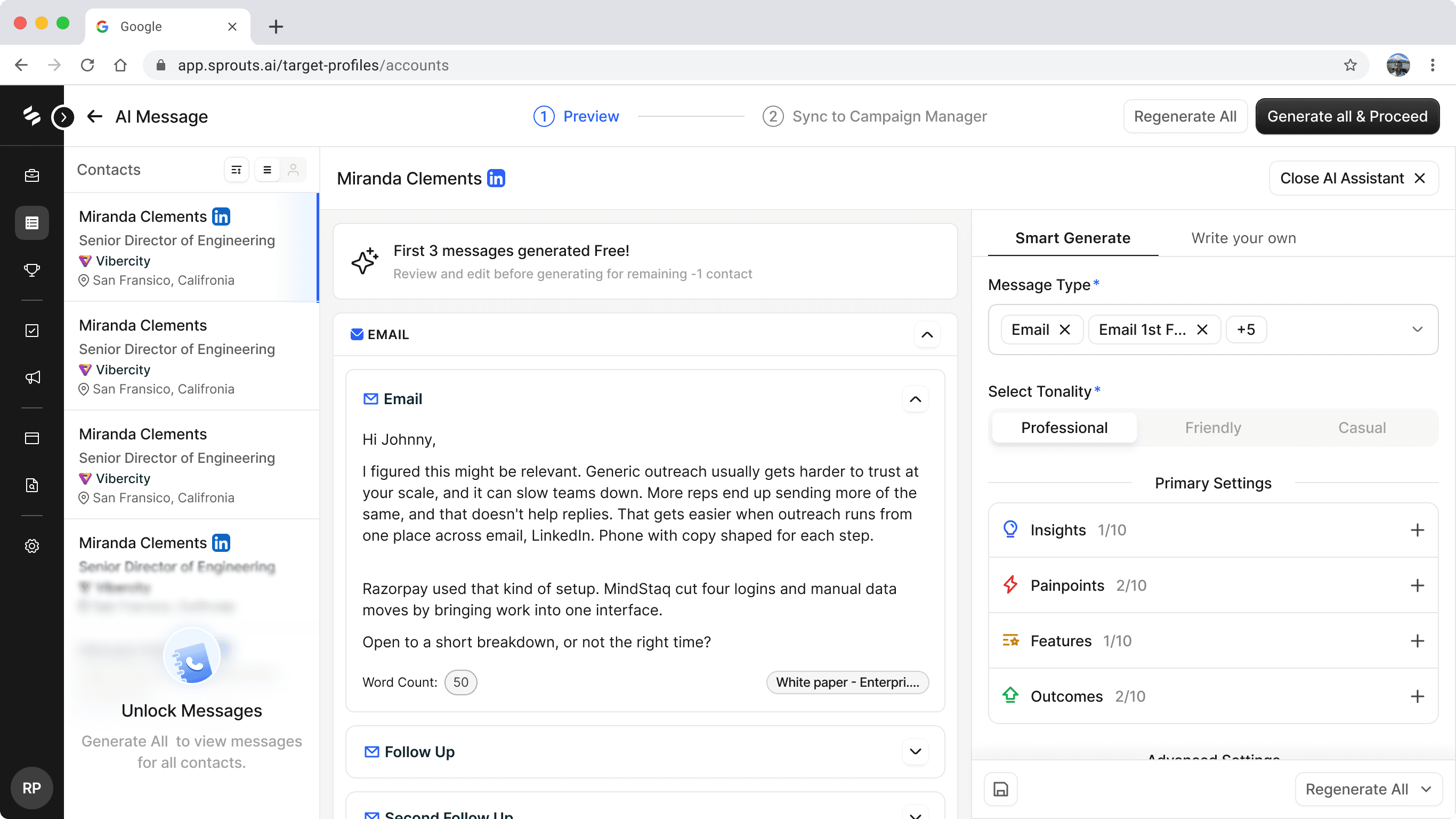
User-Interviews showed power users wanted custom-prompt only. But defaulting everyone into a raw prompt field would've hurt new-user activation.
Progressive disclosure resolved it: Smart Generate as default, Write Your Own always one click away, switchable mid-flow either direction.

3. Free Preview Zone — solving trust
I checked unit economics with eng — generating a message cost roughly $8 per thousand sends. That's cheap enough to give away a handful for free across all three formats (email, LinkedIn connect, LinkedIn post-connect), so reps could test tonality and quality before spending real credits.
Low cost to us, high trust payoff for them
4. AI Reasoning — solving trust at the decision level
I had identified this gap early on—I wanted reps to understand why the AI wrote a message, not just see the final output. It was initially blocked because messages were rendered as raw HTML, so we shipped it later as a V2. Now every email, LinkedIn message, and call script includes a "Why this message?" panel that explains the reasoning behind the AI's approach.

5. Custom Prompt Flow
Smart Generate isn't a separate mode you're locked into — it's a starting point. The tab sits right next to Write your own, so a rep can generate through the guided flow and still drop into a raw prompt the moment they want more control, without losing what's already been generated.
This is what makes progressive disclosure work here: the default path stays simple for new users, but power users aren't gated behind a settings toggle or a different entry point — they're one click away, always.

6. Inline variables feature
The / command pulls TAL data columns directly into the draft as variables — reps don't have to leave the message to go look something up.

Ground the message in real context
When manually drafting the AI message, users can switch to the profile summary view to gather more context about the prospect. The person’s full LinkedIn profile is rendered, helping users maintain context while generating the message.

The Impact & Retrospective
Adoption — Lowering the barrier with website enrichment increased target adoption of HPM.
Trust — The free preview let users see real, contact-level quality before committing credits. As message quality improved, trust followed.
Standardization — Website enrichment gave every team a single, approved messaging library instead of scattered manual inputs.
MIXPANEL NUMBERS
How I measured impact
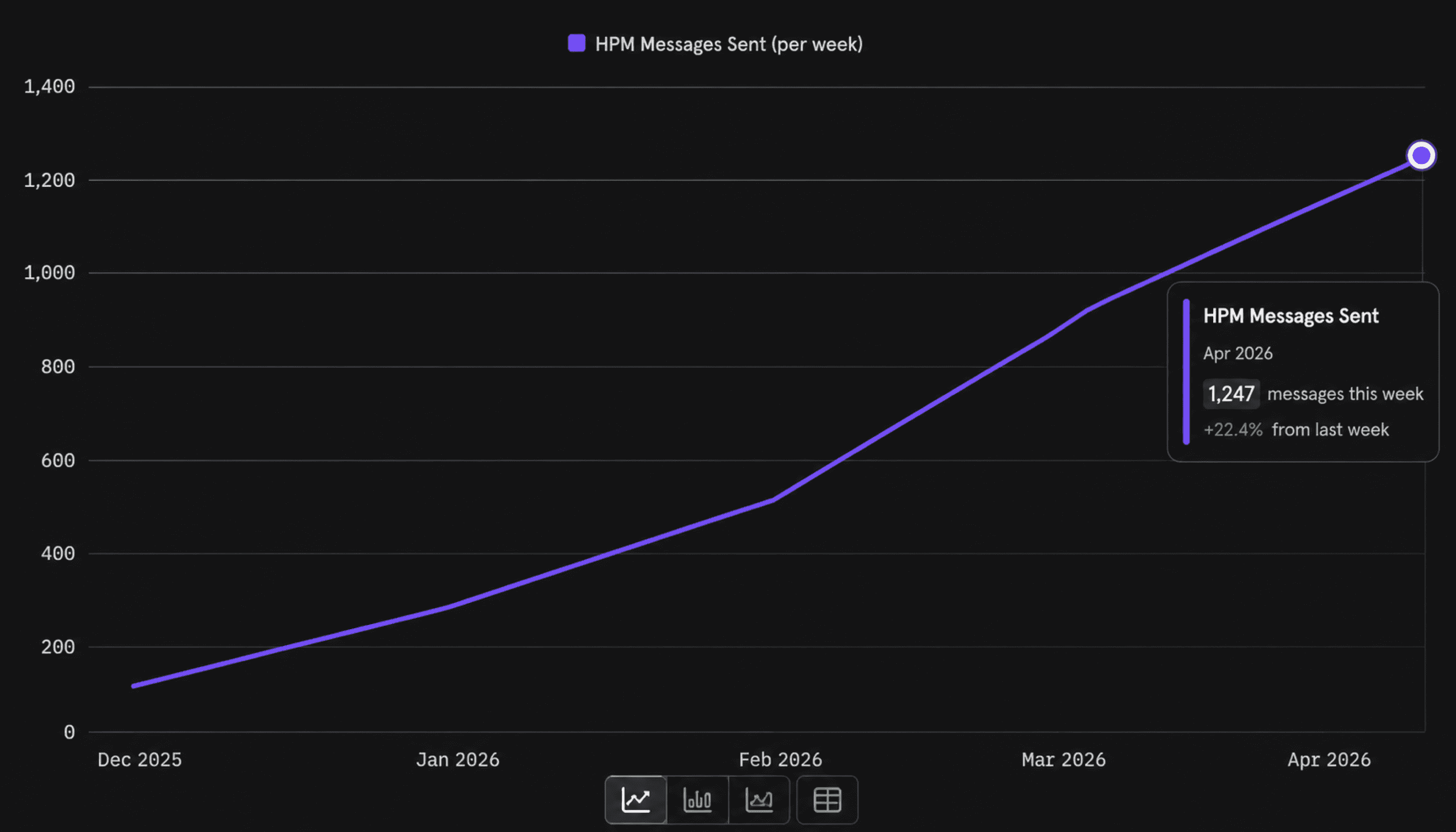
North-star metric — HPM messages sent per week. Activation and adoption captured in a single number: are teams actually sending personalized messages, week over week?
Onboarding activation vs. HPM activation. Comparing whether users who completed onboarding actually reached first message generation — isolating where the drop-off between “signed up” and “got value” lived.

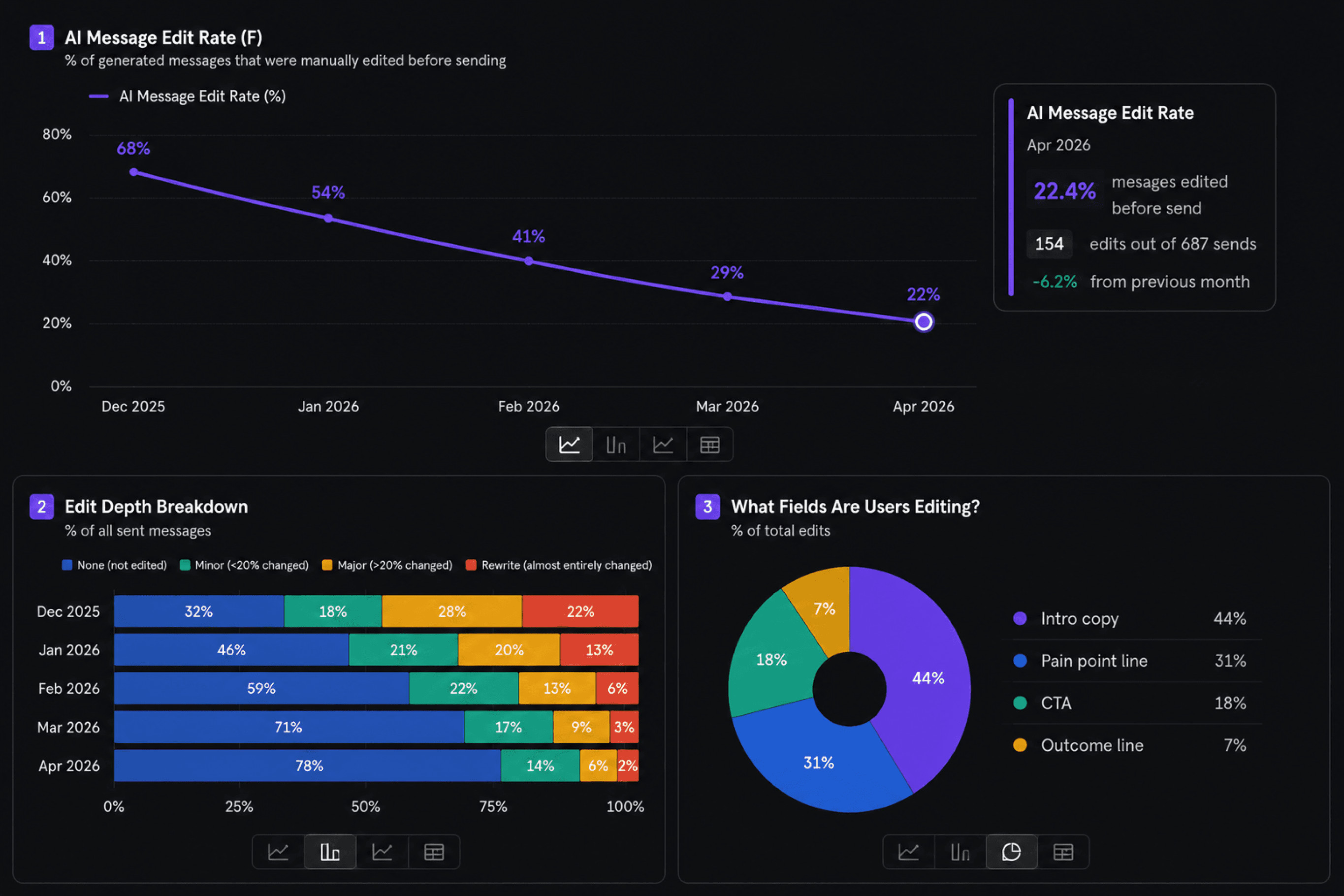
Edit rate of AI messages. How much reps changed the generated output — a proxy for how well the AI understood context. A falling edit rate signaled better first-draft quality over time.